Ultrasonic Communications (pt.1)

Ultrasonic Data Communication Protocol#
Recently I started experimenting with an unusual way for computers to communicate: sound waves.
Instead of sending data through Wi-Fi, Bluetooth, or Ethernet, this project demonstrates how information can be transmitted using ultrasonic frequencies: sound waves that are near or above the upper limit of human hearing.
The idea is simple:
Convert digital data into high-frequency sound, play it through a speaker, record it using a microphone and decode it.
How the System Works#
The system is composed of three main stages:
- Encoding text into binary
- Modulating binary into ultrasonic frequencies
- Decoding the signal back into the original message
Step 1 — Converting Text to Binary#
First we convert a message into a stream of bits.
def text_to_bits(text):
    """Convert string to a list of bits."""
    bits = []
    for char in text:
        # 1. Get ASCII value (e.g., 'A' -> 65)
        ascii_val = ord(char)

        # 2. Convert to binary (e.g., 65 -> '01000001')
        # [2:] removes the '0b' prefix, zfill(8) ensures it's always 8 bits
        bin_val = bin(ascii_val)[2:].zfill(8)

        # 3. Add individual integers to our list
        bits.extend([int(b) for b in bin_val])
    return bits
Example:
Text: "S"
ASCII: 83
Binary: 01010011
Easy.
Step 2 — Generating Ultrasonic Signals#
Now that we have a list of bits representing our message, let’s explain how we can translate these bits into ultrasonic tones.
The modulation method used in this project is Binary Frequency Shift Keying (BFSK). In this scheme, binary data is encoded using two different frequencies.
In this implementation, a 0 is represented by a 17 kHz sine wave, while a 1 is represented by a 19 kHz sine wave. Each tone lasts for a fixed duration (for example 0.1 seconds), and the tones are played sequentially to form the complete transmission. By analyzing which frequency is present during each time interval, the receiver can reconstruct the original bit sequence.
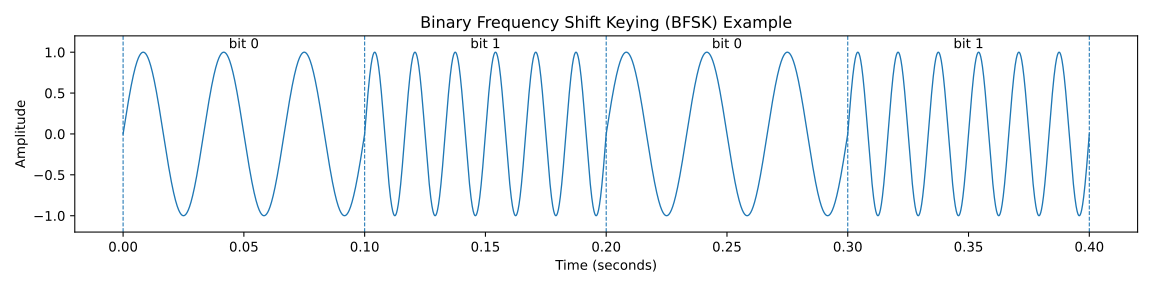
The figure above illustrates this concept. Each time segment represents one transmitted bit. When the waveform oscillates at the lower frequency (17 kHz), the transmitted bit is 0. When the waveform switches to the higher frequency (19 kHz), the transmitted bit is 1. By detecting these frequency changes over time, the receiver can decode the binary message embedded in the ultrasonic signal.
Now let’s see how to implement this in Python.
import numpy as np
from scipy.io import wavfile

# Configuration
FS = 44100          # Sample rate (standard)
FREQ_0 = 17000      # Hz for bit '0'
FREQ_1 = 19000      # Hz for bit '1'
BIT_DURATION = 0.1  # Seconds per bit (start slow to ensure it works!)
FILENAME = "ultrasound_data.wav"
Now we generate the signal.
def generate_ultrasound(bits):
    full_signal = np.array([], dtype=np.float32)

    # 1. Create a "Time Window" for a single bit
    # FS * BIT_DURATION gives us the number of data points (samples) per bit
    t = np.linspace(0, BIT_DURATION, int(FS * BIT_DURATION), endpoint=False)

    for bit in bits:
        # 2. Select Frequency (The "Modulation" step)
        freq = FREQ_1 if bit == 1 else FREQ_0

        # 3. Generate the Sine Wave
        # Formula: A * sin(2 * pi * f * t)
        tone = 0.5 * np.sin(2 * np.pi * freq * t)

        # 4. Append to the master recording
        full_signal = np.append(full_signal, tone)

    return full_signal
Finally we save the encoded data as an audio file.
message = "SECRET"
bit_sequence = text_to_bits(message)
audio_data = generate_ultrasound(bit_sequence)

wavfile.write(FILENAME, FS, (audio_data * 32767).astype(np.int16))
This file now contains the encoded ultrasonic transmission.
Step 3 — Visualizing the Signal#
If we plot the transmitted signal in the time domain, we simply see a rapidly oscillating waveform. While this representation shows the amplitude of the signal over time, it does not clearly reveal the information we encoded. The signal oscillates too quickly for us to visually distinguish whether the transmitted bit corresponds to 17 kHz or 19 kHz.
For this reason, a frequency-domain representation is much more useful.
A common tool for analyzing signals whose frequency changes over time is a spectrogram.
A spectrogram can be thought of as a sequence of Fourier transforms computed over short time windows. Instead of computing a single Fourier transform for the entire signal, the signal is divided into many small segments. For each segment, a Fourier transform is calculated to determine which frequencies are present during that short time interval.
These individual frequency spectra are then stacked side by side in time, creating a two-dimensional representation of how the frequency content of the signal evolves.
A spectrogram therefore represents:
- X-axis: Time
- Y-axis: Frequency
- Color intensity: Strength (power) of that frequency component
In other words, the color indicates how strongly a certain frequency is present at a given moment in time.
Generating the Spectrogram#
We can generate the spectrogram in MATLAB with the following code:
%% 1. Load the Audio Signal
filename = 'ultrasound_data.wav';
[y, fs] = audioread(filename);

% If the audio is stereo, take only one channel
if size(y, 2) > 1
    y = y(:, 1);
end

%% 2. Visualize the Waveform (Time Domain)
figure('Name', 'Ultrasound Analysis');
subplot(2,1,1);
t_axis = (0:length(y)-1)/fs;
plot(t_axis, y);
title('Raw Ultrasonic Signal (Time Domain)');
xlabel('Time (s)');
ylabel('Amplitude');
grid on;

%% 3. Generate the Spectrogram (Frequency Domain)
% We want high frequency resolution to distinguish 17kHz from 19kHz
subplot(2,1,2);
windowSize = round(fs * 0.05); % 50ms window
overlap = round(windowSize * 0.5);
nfft = 2048; % High FFT resolution

[S, F, T, P] = spectrogram(y, windowSize, overlap, nfft, fs, 'yaxis');

% Plot it and zoom in on the relevant frequencies (15kHz to 21kHz)
imagesc(T, F/1000, 10*log10(P)); % Convert to decibels for better contrast
set(gca, 'YDir', 'normal');
ylim([15 21]);
colormap jet;
colorbar;
title('Spectrogram (Digital Data Visualization)');
ylabel('Frequency (kHz)');
xlabel('Time (s)');
Interpreting the Spectrogram#
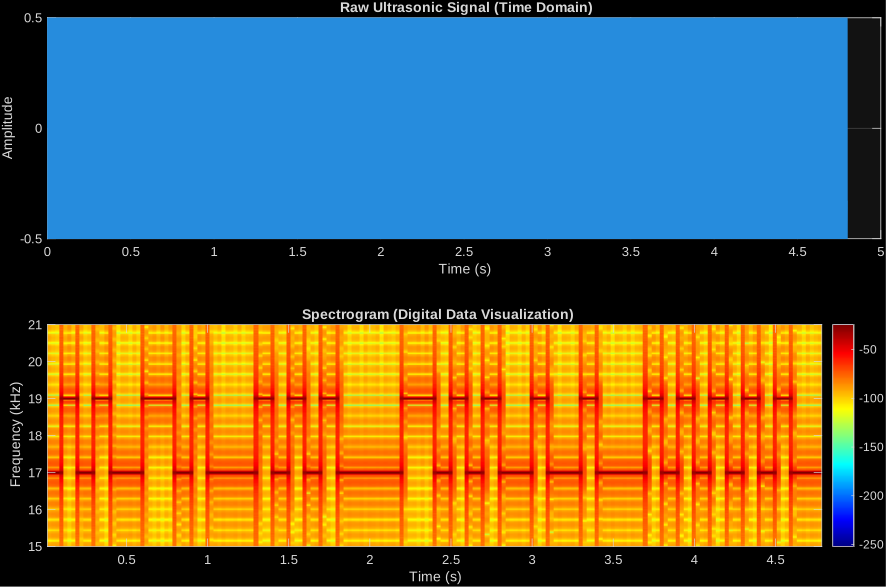
Once the signal is represented as a spectrogram, the structure of the modulation becomes immediately clear.
Since the system uses Binary Frequency Shift Keying (BFSK) with two frequencies
0 → 17 kHz
1 → 19 kHz
we expect the energy of the signal to appear around those two frequencies.
In the spectrogram above we can clearly observe two horizontal bands:
- A band near 17 kHz, representing transmitted 0 bits
- A band near 19 kHz, representing transmitted 1 bits
Each rectangular block corresponds to one bit interval. When the energy is concentrated around 17 kHz, the transmitted bit is 0. When the energy shifts to 19 kHz, the transmitted bit is 1.
Recovering the Bitstream#
Once the signal is represented in the frequency domain, recovering the transmitted data becomes straightforward.
The decoding process consists of determining which frequency is dominant during each bit interval:
- Divide the signal into time windows equal to the bit duration.
- For each window, compute the frequency spectrum.
- Measure the energy around 17 kHz and 19 kHz.
- Choose the frequency with the strongest energy.
17 kHz → 0
19 kHz → 1
By repeating this process across the entire signal, we reconstruct the original binary bitstream, which can then be grouped into bytes and converted back into ASCII characters to recover the transmitted message.
The following MATLAB code performs this automatic detection.
% Logic Check:
fprintf('Looking for peaks at 17 kHz (Bit 0) and 19 kHz (Bit 1)...\n');

%% 4. Automatic Bit Detection
bitDuration = 0.1; % Same as Python
numSamplesPerBit = round(fs * bitDuration);
numBits = floor(length(y) / numSamplesPerBit);

detectedBits = zeros(1, numBits);

for i = 1:numBits

    % 1. Grab the chunk of audio for this specific bit
    startIndex = (i-1) * numSamplesPerBit + 1;
    endIndex = i * numSamplesPerBit;
    bitChunk = y(startIndex:endIndex);

    % 2. Run an FFT on just this chunk
    chunkFFT = abs(fft(bitChunk));
    freqs = (0:length(chunkFFT)-1) * (fs/length(chunkFFT));

    % 3. Find the "Power" at our two target frequencies
    [~, idx0] = min(abs(freqs - 17000));
    [~, idx1] = min(abs(freqs - 19000));

    power0 = chunkFFT(idx0);
    power1 = chunkFFT(idx1);

    % 4. Decision Logic: Which frequency is louder?
    if power1 > power0
        detectedBits(i) = 1;
    else
        detectedBits(i) = 0;
    end
end

fprintf('Detected Bit Sequence:\n');
disp(detectedBits);
The algorithm splits the signal into time windows equal to the bit duration (0.1 s). For each window it computes a Fast Fourier Transform (FFT) and compares the energy at 17 kHz and 19 kHz. The stronger frequency determines whether the detected bit is 0 or 1, allowing the full binary message to be reconstructed.
Step 4 — Decoding the Message#
Once the bitstream is recovered, decoding is straightforward.
We simply convert groups of 8 bits back into ASCII characters.
def bits_to_text(bit_list):
    """Convert a list of bits back into a string."""
    chars = []
    # Loop through the list 8 bits at a time
    for i in range(0, len(bit_list), 8):
        # 1. Grab an 8-bit chunk
        byte = bit_list[i:i+8]

        # 2. Join the integers into a string (e.g., [0,1,0...] -> "010...")
        bin_str = "".join(str(b) for b in byte)

        # 3. Convert binary string to integer, then integer to character
        char = chr(int(bin_str, 2))
        chars.append(char)

    return "".join(chars)
The original message can then be reconstructed.
matlab_output = [0, 1, 0, 1, 0, 0, 1, 1, ...]
decoded_message = bits_to_text(matlab_output)
print(f"Decoded Message: {decoded_message}")
And the final output is…
Decoded Message: SECRET
Yay! Message recovered!
Future Improvements#
If you look closely, you might notice that this isn’t exactly the pipeline I described at the beginning.
In this first version of the project, the signal is generated, analyzed, and decoded entirely on the same machine. The audio file is created in Python and then directly processed in MATLAB, meaning the whole system stays “enclosed” inside my laptop.
This is useful for validating the modulation scheme and decoding logic, but it does not yet represent a real communication channel.
In a real scenario the pipeline would look more like this:
computer → speaker → air → microphone → decoder
The ultrasonic signal would actually be played through a speaker and recorded by a microphone. Once we move to this setup, things become more interesting (and more challenging). Real recordings introduce several complications such as:
- environmental noise
- microphone frequency response
- signal attenuation
- synchronization issues (detecting when the transmission starts and ends)
Handling these problems will require additional signal processing techniques such as filtering, synchronization markers, and more robust decoding logic.
This is exactly what I plan to explore in Part 2 of this project.
In the next step, I will implement the full acoustic communication pipeline and test how well the system performs when the signal actually travels through the air.
There is also a small cybersecurity twist to all of this. Systems that are physically isolated from networks, often called air-gapped systems, are designed to prevent data from leaving the machine. But what if data could leave the computer without using any network at all?
Using sound as a communication channel opens up some interesting possibilities that researchers have explored in the past. I’ll dive deeper into this idea and the real-world implications in the next part of the project.